Feature
A free Apple Watch app for logging your lifts
What can you do with WLog on Apple Watch?
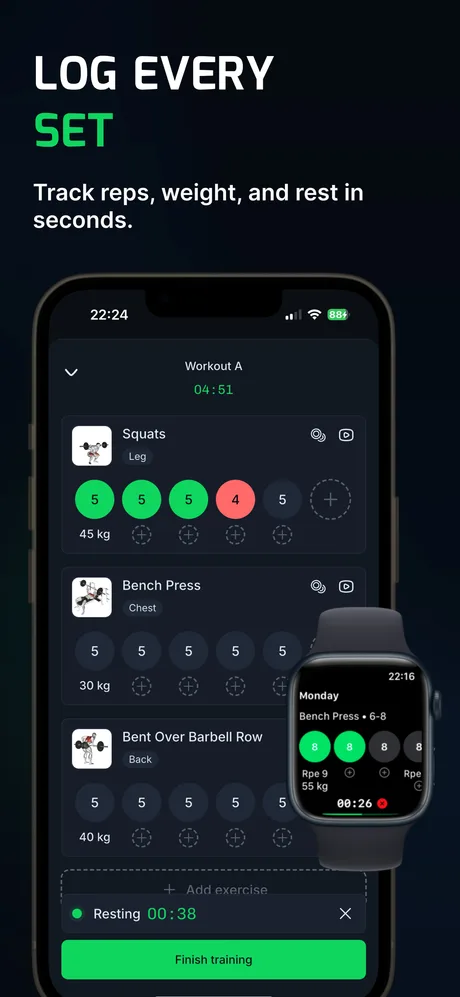
- Start a workout from the routines on your iPhone.
- Log sets and set the weight with a picker on the watch.
- Run the rest timer after each set.
- See live heart rate and active energy while the workout runs.
- Stay in sync: a set ticked on the watch shows on the phone and the other way round, in real time.
Do you need your iPhone with you?
Yes, keep it nearby. WLog's watch app is a companion to the iPhone app: your workouts come from the phone, and sets sync back to it as you go. If you want to leave the phone in a locker, Strong advertises Apple Watch logging with or without the iPhone, and Hevy says watch workouts save when the watch reconnects to the iPhone. Fitbod needs the iPhone to start and save a workout.
Does it save workouts to Apple Health?
Yes. The watch runs a workout session that records heart rate and active energy, and finished workouts are written to Apple Health. When the watch has already saved the workout, the iPhone skips its own copy, so you do not get duplicates. WLog also reads and writes body weight in Apple Health.
How do Apple Watch workout apps compare?
| WLog | Strong | Hevy | Fitbod | JEFIT | |
|---|---|---|---|---|---|
| Apple Watch app | Yes, free; use with iPhone nearby | Yes; logs with or without iPhone | Yes, free; saves when it reconnects to iPhone | Yes; starting and saving need the iPhone | Elite only |
| Wear OS app | No | Yes | Yes, free | Yes; workouts save on the phone | Yes |
| Price (US) | $6.99/mo or $39.99/yr (7-day trial on yearly) | $4.99/mo, $29.99/yr or $99.99 lifetime | $2.99/mo, $23.99/yr or $74.99 lifetime | $15.99/mo or $95.99/yr | $12.99/mo or $69.99/yr (Elite) |
Prices are US list prices in USD from each app's App Store page or help center. Local prices, offers and legacy plans differ.
Is the WLog Apple Watch app free?
Yes. The watch app needs no subscription, and neither does automatic progression: hit your reps on the watch and the weight still goes up for next session. PRO adds cloud backup and sync, AI program import and advanced charts, none of which the watch needs. JEFIT, by comparison, lists its watch app under Elite.
Who makes WLog?
WLog is made by an independent developer who ships from user feedback: 14 App Store releases in 2026 (6.0.0 to 6.4.5), five of them since August 23. In 2022, App Store reviewers asked for Apple Watch and Apple Health support; both have since shipped, and the watch app is free.
WLog has 10,000+ downloads: about 10,550 first-time iOS downloads through August 31, 2026, plus 5,000+ installs on Google Play. WLog is rated 4.7★ on the App Store in Türkiye (22 ratings) and 4.8★ on Google Play in Türkiye (40 reviews), where most of its users are so far; the US listing has no ratings yet.
Frequently asked questions
Is there a free Apple Watch app for weightlifting?
Yes. WLog's Apple Watch app is free: log sets, run the rest timer and see heart rate from your wrist, synced with your iPhone. Hevy's watch app is also free.
Can I use WLog on Apple Watch without my iPhone?
Use it with your iPhone nearby. The watch app is a companion: workouts come from the phone and sets sync back in real time.
Does WLog track heart rate on Apple Watch?
Yes. During a workout the watch shows live heart rate and active energy, and the workout is saved to Apple Health.
Is WLog available on Wear OS?
No. WLog runs on Android phones, but there is no Wear OS app. Strong, Hevy, Fitbod and JEFIT list Wear OS apps.
Try WLog free
Unlimited routines, automatic weight increases and the Apple Watch app, free. No ads, no account needed.
Sources
Checked September 26, 2026. WLog facts come from the app itself (version 6.4.5), its store listings, and App Store Connect (release history and download counts); competitor facts come from their App Store and Google Play pages and official help centers.
- WLog on the App Store
- WLog on Google Play
- WLog on the App Store in Türkiye (ratings)
- WLog on Google Play in Türkiye (ratings)
- Strong — App Store listing (US)
- Strong — App Store lookup data (US)
- Strong — Google Play listing (US)
- Strong Help — What is Strong?
- Strong Help — About templates
- Strong Help — Strong PRO
- Strong Help — About RPE
- Strong Help — Export workout data
- Strong Help Center
- Hevy — App Store listing (US)
- Hevy — App Store lookup data (US)
- Hevy — Google Play listing (US)
- Hevy Help — Features guide
- Hevy Help — Hevy Pro: what it includes
- Hevy Help — Switching from Pro to free
- Hevy Help — Hevy Trainer explained
- Hevy Help — Plate calculator
- Hevy Help — RPE
- Hevy Help — Supersets
- Hevy Help — Exporting your data
- Hevy Help — Importing Strong CSV files
- Hevy Help Center
- Fitbod — App Store listing (US)
- Fitbod — App Store lookup data (US)
- Fitbod — Google Play listing (US)
- Fitbod — FAQs
- Fitbod Help — How the trial works (updated September 9, 2026)
- Fitbod Help — Apple Watch
- Fitbod Help — Wear OS on Android
- Fitbod Help — Plate calculator
- Fitbod Help — Reps in Reserve (RiR)
- Fitbod Help — Circuits and supersets
- Fitbod Help Center
- JEFIT — App Store listing (US)
- JEFIT — App Store lookup data (US)
- JEFIT — Google Play listing (US)
- JEFIT — Elite plan
- JEFIT — Watch
- JEFIT — Support FAQ
Written by the team that makes WLog. We have tried to be fair to every app here; if something is wrong or out of date, email wlog.training@gmail.com and we will correct it.