Guide
The progressive overload app that adds the weight for you
What is progressive overload?
Muscles and strength adapt to the work you give them, so the work has to rise over time for progress to continue. For lifting, the simplest way is to add a small amount of weight once you can complete the prescribed sets and reps. The hard part is not the idea but the bookkeeping: remembering last session's numbers for every lift, deciding when to add weight and when to back off.
How does WLog increase the weight automatically?
- Set the target. Each set has a rep target or a range, for example 5 reps, or 8–12.
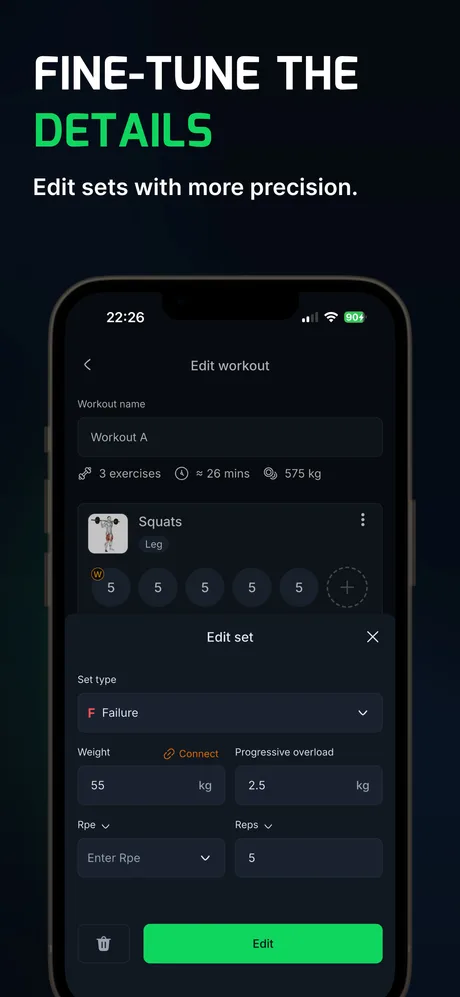
- Set the increment. Fill in the Progressive overload field for the exercise, for example +5 lb or +2.5 kg. Sets without an increment stay where they are.
- Train and log. Tick off each set with the reps you actually did.
- WLog updates the routine. If every set reached the top of its range (or its target, when there is no range), the increment is added for next session. If not, the weight holds.
- Optional: Global weight increase. Turn it on in settings and the same exercise goes up in every routine that contains it, so a squat in Workout A and Workout B stays in step.
What happens when you miss reps?
One miss changes nothing but the weight staying put. A session counts as failed when you fall below the minimum of the range. After three failed sessions in a row on one lift, WLog takes 10% off that lift only; your other lifts keep climbing.
The pre-built programs follow their own published rules. 5×5 deloads after three failed sessions. Texas Method deloads after two missed intensity-day attempts. Hypertrophy, Upper/Lower, Full Body Dumbbell, Glute Focus Foundations and 2-Day Foundation (Dumbbell) count total reps across the sets, so one short set can be made up by a long one. The bodyweight programs and Dumbbell Home Builder progress by reps and do not deload. Routines you build yourself use the 5×5 rule: three failed sessions, then 10% off.
What does a 5×5 progression look like in WLog?
A squat at 5 sets of 5 with a +5 lb increment. Every set has to reach 5 reps for the weight to go up.
| Session | Weight | Reps logged | What WLog does next |
|---|---|---|---|
| 1 | 135 lb | 5, 5, 5, 5, 5 | All sets hit: 140 lb next time |
| 2 | 140 lb | 5, 5, 5, 5, 5 | All sets hit: 145 lb |
| 3 | 145 lb | 5, 5, 5, 5, 5 | All sets hit: 150 lb |
| 4 | 150 lb | 5, 5, 4, 4, 3 | Missed: stays at 150 lb (1st failed session) |
| 5 | 150 lb | 5, 5, 5, 4, 4 | Missed: stays at 150 lb (2nd) |
| 6 | 150 lb | 5, 4, 4, 3, 3 | Missed a 3rd time in a row: deload 10% to 135 lb |
| 7 | 135 lb | 5, 5, 5, 5, 5 | All sets hit: climbing again, 140 lb |
In kilograms the pattern is the same with +2.5 kg steps, for example 60 → 62.5 → 65 kg.
Rep ranges work the same way, which is called double progression. On 3 sets of 8–12 dumbbell presses at 50 lb, sessions of 12/11/10 and 12/12/11 hold the weight; 12/12/12 moves you to 55 lb, and you build the reps back up from there.
Is automatic progression free in WLog?
Yes. Increments, holds, deloads and Global weight increase are all on the free plan, with unlimited routines. PRO adds the charts that show the result over time: per-exercise volume and 1RM charts, full PR history and strength levels.
When should you override the app?
WLog only knows the numbers you log. It cannot see poor sleep, a sore joint or form that is starting to break down, so treat each new weight as a suggestion and change it whenever it does not feel right. You can edit any weight or increment at any time.
Who makes WLog?
WLog is made by an independent developer who ships from user feedback: 14 App Store releases in 2026 (6.0.0 to 6.4.5), five of them since August 23. In 2022, App Store reviewers asked for Apple Watch and Apple Health support; both have since shipped, and the watch app is free.
WLog has 10,000+ downloads: about 10,550 first-time iOS downloads through August 31, 2026, plus 5,000+ installs on Google Play. WLog is rated 4.7★ on the App Store in Türkiye (22 ratings) and 4.8★ on Google Play in Türkiye (40 reviews), where most of its users are so far; the US listing has no ratings yet.
Frequently asked questions
What is the best app for progressive overload?
If you follow your own routine or a known program, WLog automates progressive overload on its free plan: per-exercise increments, a hold after a miss and a 10% deload after three failed sessions. If you would rather have every workout planned for you, Fitbod generates them with AI (paid).
Does WLog increase weights automatically for free?
Yes. Automatic weight increases and deloads are part of the free plan, with no limit on routines.
Can I set a different increment for each exercise?
Yes. The increment is set per exercise, so squats can go up by 5 lb while overhead presses go up by 2.5 lb. Sets without an increment do not change.
What is a deload, and when does WLog do one?
A deload is a planned step back in weight so you can build up again. WLog deloads a lift by 10% after three failed sessions in a row on routines you build yourself; pre-built programs follow their own rules, such as two missed intensity days on Texas Method.
Does it work in pounds and kilograms?
Yes. You choose the unit, and the increments follow it; the pre-built programs step by 5 lb or 2.5 kg.
Try WLog free
Unlimited routines, automatic weight increases and the Apple Watch app, free. No ads, no account needed.
Sources
Checked September 26, 2026. WLog facts come from the app itself (version 6.4.5), its store listings, and App Store Connect (release history and download counts); competitor facts come from their App Store and Google Play pages and official help centers.
- WLog on the App Store
- WLog on Google Play
- WLog on the App Store in Türkiye (ratings)
- WLog on Google Play in Türkiye (ratings)
- Fitbod — App Store listing (US)
- Fitbod — App Store lookup data (US)
- Fitbod — Google Play listing (US)
- Fitbod — FAQs
- Fitbod Help — How the trial works (updated September 9, 2026)
Written by the team that makes WLog. We have tried to be fair to every app here; if something is wrong or out of date, email wlog.training@gmail.com and we will correct it.