
Guide
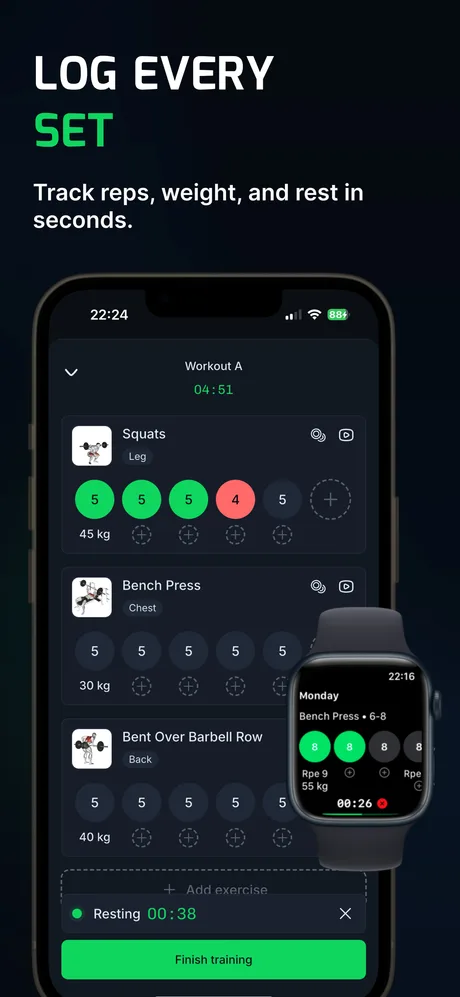
Run a 5×5 program with the weights added for you
What is a 5×5 workout?
A 5×5 is a barbell strength program built on five sets of five reps on a few compound lifts. The best-known version alternates two workouts, usually three sessions a week:
| Workout A | Workout B |
|---|---|
| Squat 5×5 | Squat 5×5 |
| Bench press 5×5 | Overhead press 5×5 |
| Barbell row 5×5 | Deadlift 1×5 |
You start light and add weight every session you complete all your reps. That steady climb is what makes it popular with beginners, and what makes it tedious to track by hand.
How does WLog handle 5×5 progression?
- All 25 reps done: the lift goes up by its increment next session. In WLog's ready-made 5×5 that is +5 lb (+2.5 kg), and +10 lb (+5 kg) for the deadlift.
- Reps missed: the weight stays the same next session.
- Three failed sessions in a row: that lift drops 10%. Only that lift; the others keep climbing.
- Squat in both workouts: turn on Global weight increase in settings and a successful squat in Workout A also raises the squat in Workout B.
See a session-by-session example on the progressive overload page.
How do you set up a 5×5 in WLog for free?
- Create a routine called Workout A and add squat, bench press and barbell row.
- Give each exercise 5 sets with a target of 5 reps and your starting weight.
- Fill in the Progressive overload field, for example +5 lb (+10 lb on the deadlift in Workout B).
- Create Workout B with squat, overhead press (5×5) and deadlift (1×5).
- Turn on Global weight increase in settings so both squats move together.
- Alternate A and B. After each session WLog sets the next weights for you.
All of this is free, with no limit on routines. The ready-made 5×5, which sets up both workouts and starting weights for you, is part of PRO, along with the Texas Method for when linear progress slows down.
Is WLog the StrongLifts app?
No. WLog is an independent workout tracker and is not affiliated with or endorsed by StrongLifts. "StrongLifts-style" describes the common A/B 5×5 structure, which you can run in any tracker; WLog's part is doing the weight changes for you.
Who makes WLog?
WLog is made by an independent developer who ships from user feedback: 14 App Store releases in 2026 (6.0.0 to 6.4.5), five of them since August 23. In 2022, App Store reviewers asked for Apple Watch and Apple Health support; both have since shipped, and the watch app is free.
WLog has 10,000+ downloads: about 10,550 first-time iOS downloads through August 31, 2026, plus 5,000+ installs on Google Play. WLog is rated 4.7★ on the App Store in Türkiye (22 ratings) and 4.8★ on Google Play in Türkiye (40 reviews), where most of its users are so far; the US listing has no ratings yet.
Frequently asked questions
What is the best app for a 5×5 workout?
Any app that logs sets and reps can run a 5×5. WLog adds the weight for you: after a session where you hit all 25 reps, the lift goes up by your increment, and after three failed sessions it deloads 10%. Building the routine and the automatic increments are free.
How much weight should I add each 5×5 session?
The usual step is 5 lb (2.5 kg) per session on squat, bench, row and overhead press, and 10 lb (5 kg) on the deadlift. WLog's ready-made 5×5 uses those steps, and you can change them per exercise.
What happens when I fail a 5×5 session in WLog?
The weight stays the same next time. If you fail the same lift three sessions in a row, WLog lowers it by 10% so you can build back up.
Is the 5×5 program free in WLog?
Building your own 5×5 routine with automatic increments is free. The ready-made 5×5 program is part of PRO; two other starter programs are free.
Try WLog free
Unlimited routines, automatic weight increases and the Apple Watch app, free. No ads, no account needed.
Sources
Checked September 26, 2026. WLog facts come from the app itself (version 6.4.5), its store listings, and App Store Connect (release history and download counts); competitor facts come from their App Store and Google Play pages and official help centers.
- WLog on the App Store
- WLog on Google Play
- WLog on the App Store in Türkiye (ratings)
- WLog on Google Play in Türkiye (ratings)
Written by the team that makes WLog. We have tried to be fair to every app here; if something is wrong or out of date, email wlog.training@gmail.com and we will correct it.