
Feature
Turn a photo or PDF of a workout program into a routine
How do you import a workout program into WLog?
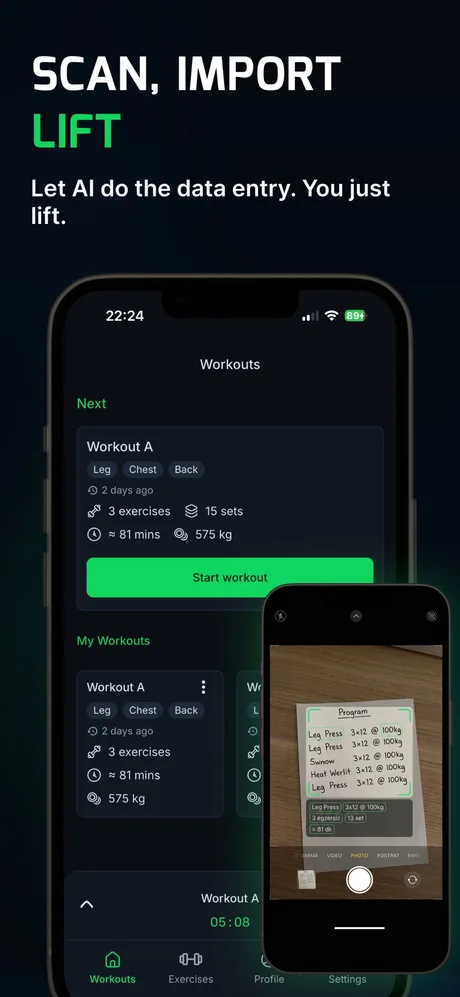
- Open WLog and start an AI import.
- Choose a source: take a photo, pick an image from your gallery, choose a PDF, JPG, PNG or TXT file, or paste text.
- WLog reads the program and drafts a routine with its exercises, sets and reps.
- Check the preview and fix anything it misread.
- Save or activate the routine (PRO). From then on, logging and automatic progression work as with any routine.
Which formats can WLog import?
| Source | Works? | Good for |
|---|---|---|
| Camera photo | Yes | A printed plan, a notebook page, a gym whiteboard |
| Screenshot or gallery image | Yes | A program from a social post, a website or a message |
| PDF file | Yes | An ebook or a coach's plan |
| JPG, JPEG or PNG file | Yes | Images saved to Files |
| TXT file | Yes | Notes exported as plain text |
| Pasted text | Yes | Text copied from notes, a chat or a spreadsheet, including CSV-style rows |
| CSV file | No | The file picker does not accept .csv; paste the contents instead |
| Workout history from Strong, Hevy or others | No | AI import builds routines, not past sessions |
Is AI import free?
You can run an import and preview the routine for free. Saving or activating an imported program requires WLog PRO ($6.99 a month or $39.99 a year, with a 7-day free trial on the yearly plan). WLog allows up to 3 imports every 30 minutes.
How accurate is the import?
Clear, well-lit photos and typed text are the easiest to read. Automated reading is not perfect: handwriting, abbreviations and unusual exercise names can come out wrong, so review the preview before you train with it. Everything stays editable after saving.
Can I use AI import to switch from another app?
For routines, yes: screenshot your routine in Strong, Hevy or any other app, or copy its text, and import it. Your past workout history does not come across, because WLog has no CSV or history import. See WLog vs Strong and WLog vs Hevy for what else changes.
Who makes WLog?
WLog is made by an independent developer who ships from user feedback: 14 App Store releases in 2026 (6.0.0 to 6.4.5), five of them since August 23. In 2022, App Store reviewers asked for Apple Watch and Apple Health support; both have since shipped, and the watch app is free.
WLog has 10,000+ downloads: about 10,550 first-time iOS downloads through August 31, 2026, plus 5,000+ installs on Google Play. WLog is rated 4.7★ on the App Store in Türkiye (22 ratings) and 4.8★ on Google Play in Türkiye (40 reviews), where most of its users are so far; the US listing has no ratings yet.
Frequently asked questions
Can I import a workout plan from a photo?
Yes. Take a photo or choose an image, and WLog's AI drafts a routine with the exercises, sets and reps. Previewing is free; saving requires PRO.
Can WLog import a PDF workout program?
Yes. Pick the PDF from your files and WLog turns it into an editable routine. JPG, PNG and TXT files work too.
Can I import a CSV file?
No. The file picker does not accept CSV files. You can paste CSV text to import a program, but WLog cannot import workout history from a CSV.
Does AI import need an internet connection?
Yes. Logging, history and exercise videos work offline, but AI import needs a connection.
Is AI import part of WLog PRO?
Saving or activating an imported program is PRO. Running the import and previewing the result is free.
Try WLog free
Unlimited routines, automatic weight increases and the Apple Watch app, free. No ads, no account needed.
Sources
Checked September 26, 2026. WLog facts come from the app itself (version 6.4.5), its store listings, and App Store Connect (release history and download counts); competitor facts come from their App Store and Google Play pages and official help centers.
- WLog on the App Store
- WLog on Google Play
- WLog on the App Store in Türkiye (ratings)
- WLog on Google Play in Türkiye (ratings)
Written by the team that makes WLog. We have tried to be fair to every app here; if something is wrong or out of date, email wlog.training@gmail.com and we will correct it.