Feature
A calorie and protein tracker built into your workout log
Why track food in the same app as your workouts?
Most lifters juggle a calorie app and a workout app, and neither knows what the other is doing. In WLog the Nutrition tab sits beside your training, so a heavy week and a light food log show up in the same place. Trends put your intake next to your body weight, and protein is a target of its own rather than a line buried under calories.
How does WLog set my calorie and protein targets?
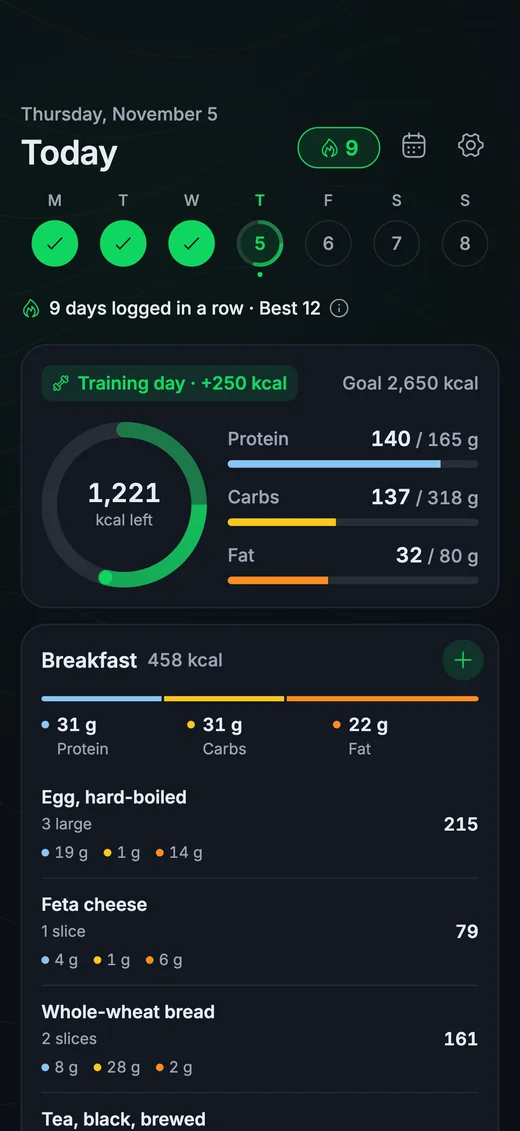
Your targets are calculated from your body weight and your goal with a formula, not by AI. Training days get more calories than rest days. Protein is a first-class target, shown next to calories. You can edit any target if you already know your numbers.
A daily ring shows calories, protein, carbs and fat against the day's targets, and every meal and every food shows its protein, carbs and fat.
How do I log food quickly?
- Search: a food library that includes local dishes, not only packaged products.
- Scan a barcode: packaged foods are looked up in Open Food Facts.
- Create a food from its label: if a product is missing, type in the numbers from the label once and reuse it.
- Saved meals: save your shake or your usual breakfast and add it in one tap.
- Copy yesterday: repeat a day you ate on repeat.
Food data comes from USDA FoodData Central and Open Food Facts. WLog does not use a paid food database.
Can I see my progress over time?
A logging streak counts the days you log food, a calendar lets you open any past day, and trends put your intake beside your body weight. Reading the two together is how you tell whether your current intake is moving your weight the way you want.
What is free and what is PRO?
| Feature | Free | PRO |
|---|---|---|
| Food log, search and saved meals | Yes | Yes |
| Barcode scan | Yes | Yes |
| Calorie and protein targets | Yes | Yes |
| Logging streak | Yes | Yes |
| History older than the last two weeks | No | Yes |
| Cloud backup and sync | No | Yes |
| Weekly AI check-in | No | Yes |
The Monday AI check-in can include nutrition as a fourth pillar beside consistency, progress and balance when you logged food on at least 3 days that week. It relates your protein to your lift progress using facts from your own log and does not give diet advice. AI features are for users 18 and over.
Does it sync with Apple Health and Health Connect?
Optionally. When you turn it on, WLog writes the energy, protein, carbs, fat and fiber of the foods you log to Apple Health or Health Connect. It never reads nutrition data from them.
Who makes WLog?
WLog is made by an independent developer who ships from user feedback. In 2022, App Store reviewers asked for Apple Watch and Apple Health support; both have shipped, and the Apple Watch and Wear OS apps are free.
WLog has 10,000+ downloads across the App Store and Google Play. WLog is rated 4.7★ on the App Store and 4.8★ on Google Play in Türkiye, where most of its users are.
Frequently asked questions
Is the WLog calorie tracker free?
The food log, barcode scan, targets and logging streak are free. PRO adds history older than the last two weeks, cloud backup and sync, and the weekly AI check-in.
Does WLog track protein?
Yes. Protein is its own target next to calories, and every meal and food shows its protein, carbs and fat.
Can I scan a barcode to log food?
Yes. WLog looks up packaged foods in Open Food Facts. If a product is missing, you can create the food from its label.
Are my targets set by AI?
No. They come from a formula based on your body weight and goal, with more calories on training days, and you can edit them.
Does WLog write nutrition data to Apple Health?
If you turn on Health sync, it writes the energy, protein, carbs, fat and fiber of logged foods to Apple Health or Health Connect. It never reads nutrition data.
Try WLog free
Unlimited routines, automatic weight increases and the Apple Watch and Wear OS apps, free. No ads, no account needed.